What this article covers
- What the two tools added in v2.1.224 do
- What is passed and what isn't when a message arrives
- How this compares to the traditional handoff of "writing an artifact for someone to read later" — which one suits what
- Environments where it doesn't work, and settings the receiving side can control
Written for people running Claude Code in parallel across multiple terminals or multiple machines.
In Claude Code v2.1.224, you can now send text to another running session
Claude Code runs one session per terminal window. Open multiple terminals and that many sessions run side by side — for example, writing an app in one while fixing infrastructure in another.
Until now, sessions running side by side didn't know about each other. There were only two ways to pass one session's result to another. A person copies and pastes, or writes it to a file for another session to read later.
In v2.1.224, a third way was added: list running sessions, specify one by name, and deliver text to it.
| Tool | Role |
|---|---|
ListAgents |
Lists the sessions currently reachable |
SendMessage |
Delivers text to one of them, specified by name |
Neither is something a person calls directly — Claude uses them on its own. What the person writes is a single line like "ask the session in the next terminal whether the migration finished," and Claude handles finding the counterpart, selecting it, sending, and waiting for a reply.
Only three things are passed: sender name, reply destination, and body text
Conversation history isn't passed. Files that were read aren't passed either. Neither is CLAUDE.md, memory, or permission settings.
The recipient remains a separate session that started up by reading its own settings from its own machine's disk, and a single short piece of text arrives there. This is not context sharing — it's an addressed message.
If you want to move the conversation along with its context, what you use is session resume, not this feature.
Messages arrive between tool calls, and running commands aren't interrupted
- The recipient reads it between tool calls. A running command is never stopped
- If the recipient is idle, that message starts a new turn
- A received message counts toward usage the same way a prompt typed by a person does
The third point is easy to miss. What increases isn't the sender's usage — it's the recipient's.
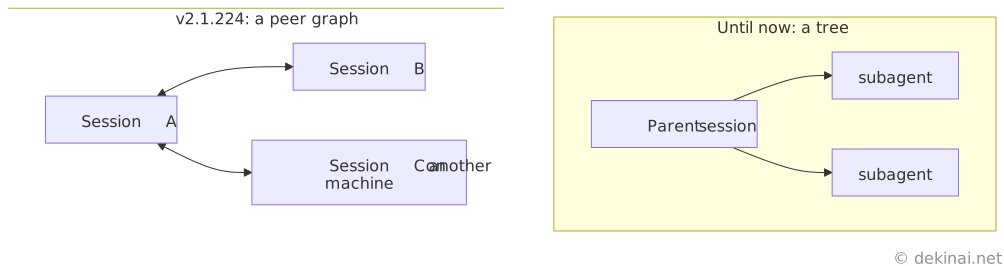
What's new is peer-to-peer sessions — SendMessage itself already existed
The previous SendMessage only reached children (subagents) that a parent session had spawned itself,
a one-way tree structure from parent to child.
What's changed this time is that it now extends to peer sessions outside this tree.
In the traditional handoff, the recipient's process doesn't exist at the time of writing
Passing work across sessions was already possible before. What differs is the method. You write an artifact, and another session reads it later.

What A hands off to isn't B — it's the saved artifact. B starts up later and reads it. There's no addressee; nothing happens until someone comes to look.
What direct messaging adds: the recipient being alive, no relay needed, and being able to specify an addressee
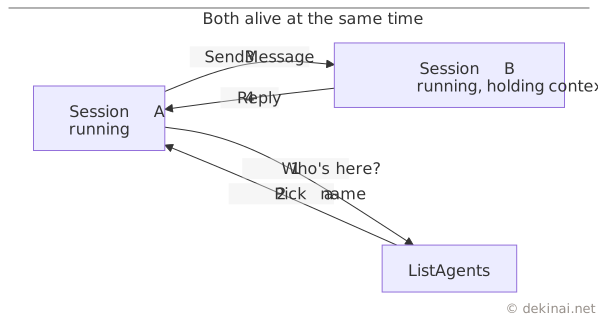
- The recipient has running context — you don't have to make it re-read "what this is about" from scratch
- No person or relay mechanism sits in between — no waiting for delivery, no person saying "start on this"
- You can discover and name the counterpart — a written note had no addressee
Flip that around: nothing beyond these three has increased. The ability itself to pass work across sessions already existed.
What's traded for speed is that no record remains
| Axis | Handoff via artifact | Cross-session message |
|---|---|---|
| Arrival | Slow (waits for a person to start it, waits for relay) | Immediate |
| Recipient | Not there yet. Reads it later | Running. Gets interrupted |
| Does it persist | Yes. Can be traced back later | No. Dissolves into the recipient's context |
| If the session dies | Survives | Disappears |
| Human judgment | Involved | Not involved |
| Cost | One write + one read | Consumes one slice of the recipient's context |
It isn't a strict upgrade. Things that need human judgment, and things you'll need to trace back later as evidence, don't belong on the direct channel. What suits the direct channel is only confirmations that are self-contained on the spot and fine to lose.
With the written-note type, premises are in place before reading; with the direct type, it's interpreted in whatever context exists at that moment
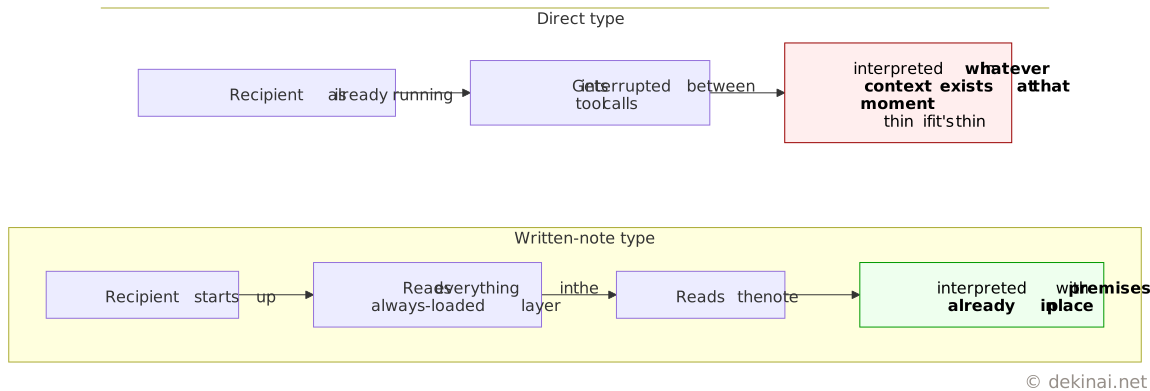
The side reading a written note reads the entire always-loaded layer (settings, conventions, environment specifics) at startup before touching the body text. The direct channel skips that and interrupts into the context of whatever's already running. What "slowness" was buying was the recipient having its premises fully in place before it read anything.
Differences in per-machine settings aren't filled in by messages
Running Claude Code on multiple machines leaves each machine with a different depth of context. Machine A has accumulated notes on conventions and environment specifics; machine B doesn't. Then on machine B,
- It explores from zero every time, so consumption increases
- Commands fail because it doesn't know that machine's specifics (path differences, OS differences)
- Since premises aren't shared, rejections and mismatched understanding increase
Cross-session messages don't fill this in. What's passed is a single piece of text, and the session on machine B remains started up having read the thin settings on machine B's own disk.

If anything, the gap can widen. The sender doesn't know what's loaded in the recipient's settings. If a person writes the prompt, the person knows how thin the other side is and can supply the missing premises. When the sender is Claude, it throws out a single line premised on its own thick context, and the recipient interprets it on top of its own thin context. Since the one message that arrives counts toward usage, only the number of times the thin side gets set in motion increases.
The always-loaded layer has no choice but to be placed on each machine individually.
The receiving side doesn't change settings or permissions because of a message
Using this to send something and alter the other side's settings is blocked deliberately, not left open due to a missing implementation.
- The receiving Claude is prohibited from changing settings or permissions because another session told it to
- Commands like
/compactinside the body text arrive as plain text and aren't executed - A message from another session doesn't count as human consent, so it can't answer a pending permission prompt either
- The recipient's own permission prompts still appear as usual
If this were allowed through, a single message would become a hijacking vector.
Which to use for what
| What you want to do | What to use |
|---|---|
| Move the conversation along with its context | Session resume |
| Conventions you want always loaded | A settings file. Place it on that machine |
| Pass one short fact to a running counterpart | Cross-session message |
| Feed in external events like CI results | channels |
There are environments where it doesn't work
- OS support is macOS and Linux. It doesn't work on native Windows (Linux inside WSL2 does work)
- It can't be used with some providers, such as Bedrock or Vertex
- If telemetry-related environment variables have turned off feature-flag evaluation, this feature stays disabled too
- Within the same machine, it goes through a per-session Unix socket and doesn't pass through Anthropic's servers. Only parties that can see the same filesystem can reach each other, so the inside and outside of a container can't see each other
- Across machines, only replying is possible. You can't initiate a conversation from your side — the other side needs to be connected via Remote Control
What the receiving side can control
- Choose
accept/hold/refuseviacrossSessionInbound. By default, an inbound message addressed to a running session that would skip a permission prompt waits for human approval - The approval dialog expires and is discarded after a default of 5 minutes (
dialogExpiry) - Repeated identical messages are dropped. Unread caps out at 50, pending caps out at 100
- Sending and receiving can be stopped independently. For receiving, use
crossSessionInbound: refuse; for sending and listing, use deny rules onSendMessage/ListAgents