In May 2026, GitHub disclosed that its internal repositories had been accessed without authorization. The direct route into GitHub's internals was a Visual Studio Code extension used by an employee, and tracing back how that extension became compromised leads to a supply chain breach that occurred at a different organization. This article organizes what happened based on the GitHub official blog and GitHub Security Advisory announcements, and also looks at how this would differ if the same thing happened on a self-hosted server run by an individual or small business.
What this article covers
- An overview of the breach GitHub disclosed and the timeline of its response
- How the VSCode extension was hijacked and came to be distributed
- The credential theft and internal repository cloning techniques the attacker used
- Concrete steps for checking for indicators of compromise
- How the defenses differ when an individual or small business runs GitLab or Gitea on their own server
1. What Happened at GitHub
Summary of the disclosure
On May 20, 2026, GitHub explained the following on its official security blog. On Monday, May 18, GitHub detected and contained the compromise of an employee's device caused by a malicious VSCode extension published by a third party. The affected version of the extension has since been removed.
According to the current assessment, what has been confirmed as exfiltrated is limited to GitHub's internal repositories. The figure of approximately 3,800 that the attacker claims is directionally consistent with GitHub's own investigation. Some of GitHub's internal repositories do contain customer-related information, such as excerpts from support interactions. However, as of now there is no evidence of impact to customer information outside the internal repositories, such as customers' own enterprises or repositories.
From Monday into Tuesday, GitHub rotated critical keys, prioritizing the highest-impact credentials.
Simplifying the overall flow gives the following.
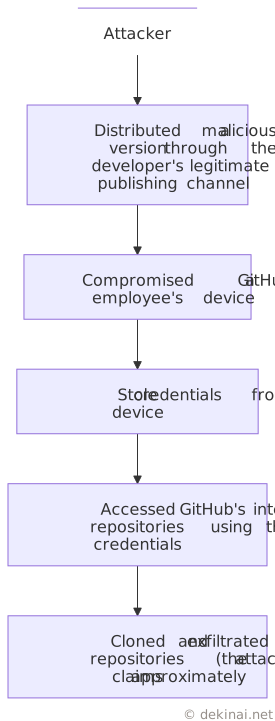
Response timeline
Summarizing GitHub's disclosure in chronological order gives the following.
| Date | Event |
|---|---|
| 2026-5-18 (Mon) | Detected and contained the compromise of an employee device |
| 2026-5-18–19 (Mon–Tue) | Rotated critical keys, prioritizing the highest-impact credentials |
| 2026-5-20 | First announcement on the official blog; published a preliminary assessment that only internal repositories were affected |
| 2026-5-26 | Announced GitHub Enterprise Server signing key rotation |
GitHub states that it will publish a more detailed report once the investigation is complete.
2. The Technical Mechanics of the Attack, and Where It Went Wrong
From here, based on the GitHub Security Advisory (GHSA-c9j4-9m59-847w, published by nrwl, the extension's developer), we look at the technical details of how the attack came together.
The origin of the breach
According to the extension's developer, the root cause was that one of its developers was caught up in a separate supply chain breach (the Tanstack breach). That breach leaked credentials via the GitHub CLI (the gh command), and the attacker used those credentials to reach a state where they could run workflows as a contributor on the nx-console repository.
At the time, within the extension's organization, one specific individual held the ability to publish new versions without approval. This permission was abused, and the attacker distributed the malicious version through the legitimate publishing channel.
Hijacking and distributing the extension
The malicious version (Nx Console 18.95.0) was published on Microsoft's extension marketplace at 12:30 UTC and remained available for about 18 minutes until it was removed at 12:48. On the other distribution channel, OpenVSX, it was published at 12:33 and remained available for about 36 minutes until it was removed at 13:09.
Because VSCode auto-updates extensions by default, it was delivered to many devices during this short window. The recorded download counts on the marketplaces were small — 28 on the VSCode Marketplace and 41 on OpenVSX — but the developer's own analysis found approximately 6,000 launches from VSCode and 1 from Cursor within two days of the attack. The recorded download counts do not match the actual number of devices that ran it.
Credential theft and persistence
The distributed extension fetched an obfuscated payload and collected credentials from multiple locations on the device. Targets included Vault tokens, npm tokens, AWS credentials (IMDS/ECS metadata, Secrets Manager, SSM, and so on), GitHub tokens and SSH keys, 1Password vault contents if it was running, and other private keys and connection strings found on the filesystem. The collected information was sent out over three channels: HTTPS, the GitHub API, and DNS. For persistence, it attempted to install a LaunchAgent on macOS and write to the sudoers file on Linux.
Organizing the activity that occurred on the device gives the following. Starting from the extension, credentials were gathered from multiple storage locations and then sent out over three channels together. Because it hasn't been disclosed which credential went out over which channel, collection and transmission are drawn separately.
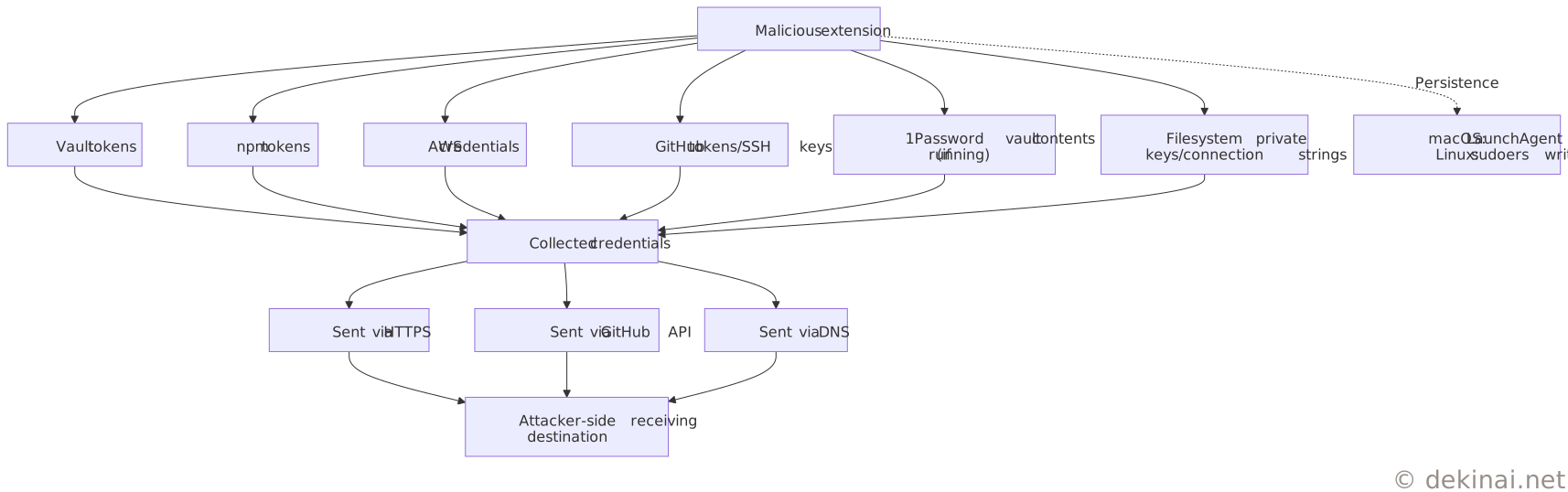
Because some of the stolen credentials led to a GitHub employee's device, the attacker ultimately reached a state where they could access GitHub's internal repositories.
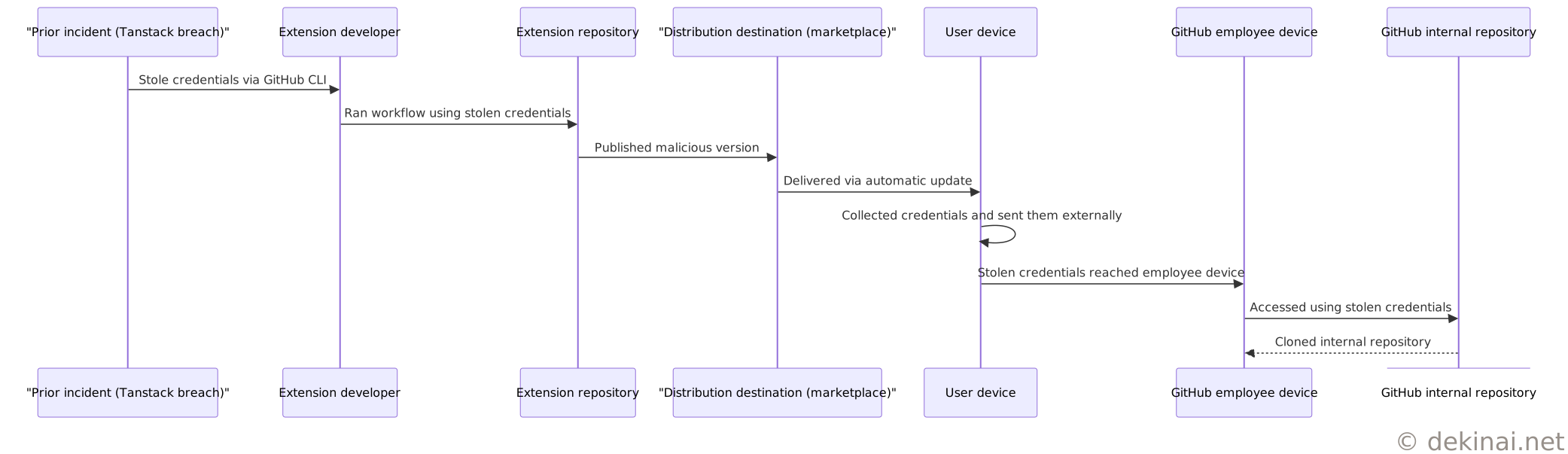
What went wrong
This chain of events points to at least the following three problems.
The first is that the operational practice did not require a second approver for publishing the extension. The developer recognized this problem and, in response, changed to a system requiring approval from two administrators.
The second is that the extension marketplace's auto-update mechanism has no review or grace period between publication and delivery. In this case, the malicious version was available for only 18 to 36 minutes, but that brevity did nothing to prevent damage — on the contrary, it was more than enough time for it to be delivered to a large number of devices.
The third is that the chain of trust stretched a long way across multiple organizations. The attack's origin was the Tanstack breach, which occurred at an organization separate from GitHub. Credentials leaked there passed to another developer, contaminating an extension that developer maintained, which reached the device of a GitHub employee who used that extension, and ultimately affected GitHub's internal systems. Even if each individual organization's defenses were working, this kind of intrusion path is hard to see unless you look at the entire cross-organizational chain of trust.
Checking for indicators of compromise
The GitHub Security Advisory lists the presence of specific files and the running of specific processes as indicators of compromise. If you had installed the affected Nx Console 18.95.0, you can check for it using the method below. The following script is for macOS and Linux. The Advisory also lists %USERPROFILE%\.bun\bin\bun.exe on Windows in addition to these.
#!/usr/bin/env bash
# Script to check indicators of compromise for Nx Console 18.95.0
# Source: GitHub Security Advisory GHSA-c9j4-9m59-847w

echo "== Checking indicator files =="
for f in \
  "$HOME/.local/share/kitty/cat.py" \
  "$HOME/Library/LaunchAgents/com.user.kitty-monitor.plist" \
  "/var/tmp/.gh_update_state"
do
  if [ -e "$f" ]; then
    echo "Detected: $f"
  fi
done

echo "== Checking for matching processes =="
ps aux | grep -E "cat\.py|__DAEMONIZED=1" | grep -v grep
An example run (when no indicators are found) looks like the following.
== Checking indicator files ==
== Checking for matching processes ==
If there is no output for either item, then at least the indicators above were not found. The absence of indicators is not proof that you were not compromised. If indicators are found, you need to update the extension to a fixed version (18.100.0 or later), stop the matching process, delete the indicator files, and rotate any credentials that could have been reached.
3. Could This Have Been Prevented?
In response to the problems reviewed so far, the developer moved to a system requiring approval from two administrators. At first glance this looks like a measure to prevent recurrence, but let's weigh how effective this kind of measure actually is against GitHub's own track record.
Measures accumulated over time
Even before this incident, GitHub had been announcing and rolling out measures against supply chain attacks centered on npm, in stages. Some measures were announced as plans and only implemented later, so the two are listed separately here.
| Time | Stage | Content |
|---|---|---|
| 2025-9 | Announced (planned) | Announced a plan to require two-factor authentication for npm publishing and move publishing tokens to a model that expires them after 7 days |
| 2025-12 | Announced (planned) | Announced "staged publishing," which introduces a pre-publication review period, in response to chained malware distribution incidents such as Shai-Hulud |
| 2026-4–7 | Implemented | Rolled out in stages: staged publishing began (2026-5), npm install scripts disabled by default (2026-6), GitHub Actions execution policies added (2026-6), Dependabot update wait period (2026-7) |
All of these measures share the same direction: narrowing publishing channels, strengthening authentication, and adding a review grace period. The "two-person approval" the developer introduced this time follows the same direction, and is nothing new.
What happened anyway
This breach happened through a different channel — the VSCode extension marketplace, not npm. The timing overlaps too: staged publishing for npm began in May 2026, the same month as this incident. And even before that, the attacker had stolen an individual developer's GitHub CLI credentials from yet another supply chain breach (Tanstack). In other words, every time one channel is hardened, a different channel not covered by that measure gets used instead.
And the "two-person approval" measure itself carries the same weakness. Even with two approvers, if both of their credentials are stolen, the approval mechanism itself is bypassed along with them. What was actually stolen in this attack included GitHub tokens, SSH keys, and CLI credentials. Adding more approvers is not, in fact, aimed at preventing that kind of theft.
So, can it be prevented?
Lining up the facts so far, the following view also holds: measures are always added to close off "whatever technique was just used," and attackers move to a different, unclosed channel. Strengthen authentication, and the credentials themselves become the target; add more approvers, and the approvers' credentials become the target. At least as far as what has been made public, measures have proceeded by closing off individual channels one at a time, and it cannot be determined whether the total number of channels is actually decreasing.
This isn't limited to this particular incident — it's a pattern that has been observed repeatedly across supply chain attacks in general, including those involving npm. It's difficult to predict in advance which channel will be used next, and at least from the publicly available information, what can be read is a state where announcements of new measures and the emergence of new techniques keep alternating.
4. The Structure of GitHub's Defenses (As Far as Public Information Shows)
GitHub has not disclosed the actual network architecture of its internal systems. What's shown here is an organization, into layers, of the defensive mechanisms GitHub describes in its official blog and documentation, based solely on publicly available information — it is not an actual internal architecture diagram.
A structure organized from public information
From the public information, four layers can broadly be identified: an entry-point layer covering things like publishing packages/extensions and pushing to repositories; an authentication-and-permissions layer covering two-factor authentication and time-limited tokens; a detection layer covering secret scanning, malware detection, and staged publishing review; and a response layer that rotates credentials after detection.
The following diagram shows the ordering of the layers, not a top-to-bottom processing sequence. Also, the scope of the features listed under each layer differs — most were built with npm as the target.
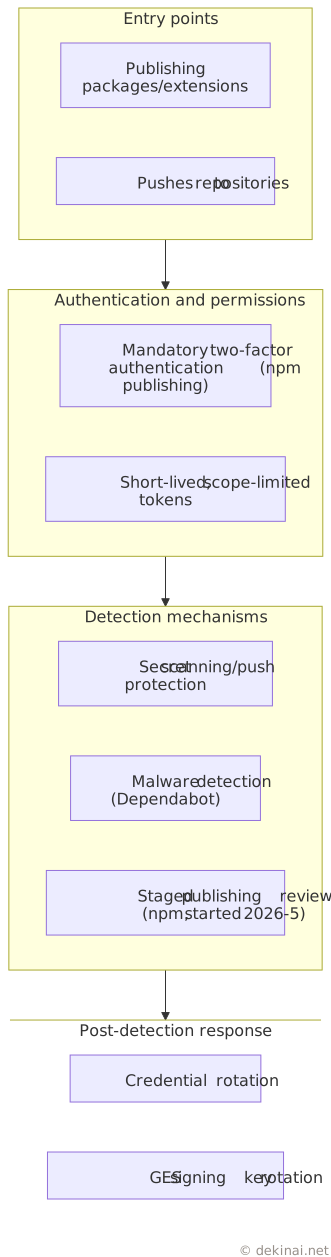
How this diagram relates to this incident
Mapping this incident's breach path onto this structure shows the following. The first thing the attacker obtained was GitHub CLI credentials — exactly what the "authentication and permissions" layer is meant to protect. The malicious extension was distributed through the VSCode extension marketplace, part of the "entry points" layer that GitHub does not directly manage. The malware detection and staged publishing review in the "detection mechanisms" layer have been built primarily for package ecosystems including npm, and this incident's extension marketplace fell outside that scope. As a result, the incident surfaced at the "post-detection response" layer — that is, at the stage of credential rotation and key replacement.
The pattern seen in Section 3 — where the channel a measure closes and the channel an attacker uses don't line up — shows up in the same form within this four-layer structure as well.
5. What Would Happen If the Same Thing Happened to an Individual or Small Business
Everything so far has been about GitHub. So what happens if you don't use GitHub and instead run GitLab or Gitea on your own server? Let's organize the differences in defensive mechanisms using an analogy to physical ailments.
Splitting the risk into three kinds
| Analogy | What actually happens | Characteristic |
|---|---|---|
| A cold | A compromised extension or package gets onto a developer's device | The source of infection is always nearby; anyone can catch it. This incident falls into this category |
| An injury | An internet-facing server is hit by indiscriminate scanning or attacks | The more foot traffic a location has, the higher the odds |
| A chronic condition | Software that hasn't been patched keeps running as-is | Progresses without noticeable symptoms; because nothing has stopped, it goes unnoticed |
One clarification: unlike colds or injuries, an attack has an intentional adversary behind it. It's not something that happens if you're unlucky — the premise is that someone doing the targeting is always searching. This analogy is meant to distinguish categories, not to talk about probability.
Mapping the four layers onto a self-hosted server
Lining up the four GitHub layers organized in Section 4 against the self-hosted case gives the following.
| Layer | GitHub | Self-hosted GitLab/Gitea |
|---|---|---|
| Entry points | Always exposed to the internet; there is no option to close it off | You decide for yourself whether to expose it; restricting access to your internal network greatly shrinks this layer's entry points |
| Authentication and permissions | The provider can roll out mandatory two-factor authentication or short-lived tokens to all applicable users at once (npm publishing, for example) | The mechanism for two-factor authentication exists, but getting everyone onto it depends on your own operations |
| Detection mechanisms | Secret scanning and malware detection are provided (the scope depends on your visibility settings and contract); staged publishing review has also been running for npm since May 2026 | Doesn't work out of the box; assembling something comparable requires extra configuration and combining external tools |
| Post-detection response | Key rotation for the highest-impact credentials was completed by the day after detection | Won't happen unless you've already defined the procedure and who owns it |
In the body analogy, the entry-points layer corresponds to "whether you go out into a crowd," the authentication-and-permissions layer to "vaccination," the detection-mechanisms layer to "regular checkups," and the post-detection-response layer to "having a primary care doctor."
A self-hosted server lets you choose not to go out into the crowd. GitHub doesn't have that option. On the other hand, regular checkups and a primary care doctor don't come included from the start.
Could a self-hosted server have prevented this incident?
No, it could not. That's because the path that reached GitHub's internal repositories in this incident was the developer's device, not the server side.
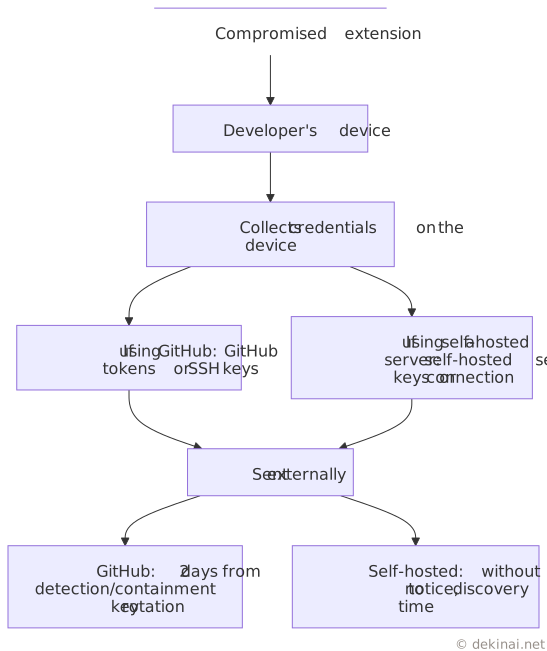
As seen in Section 2, what the extension collected from the device included GitHub tokens and SSH keys, as well as private keys and connection strings on the filesystem. If you move your hosting to a self-hosted server, what sits on the device just changes to self-hosted server keys — the fact that it can be collected doesn't change.
What's different is what happens afterward. At GitHub, detection and containment happened on May 18, and critical key rotation was finished by the following day, the 19th. Following the same flow on a self-hosted server requires having both a way to notice anomalies on the device side and a procedure for rotating keys already in place. Without that, time passes without anyone noticing that anything was exfiltrated.
The illness you catch is the same; what differs is how long it takes to find it.
Where a self-hosted server has the advantage, and what it costs
The advantage is limited to the "entry points" layer. Configuring it to not accept external connections lowers the odds of indiscriminate scanning or attacks — that is, the "injury" category. This is an option that public services, including GitHub, don't have.
The cost is that all three remaining layers become your own responsibility.
- Keep applying updates (stop, and it becomes a chronic condition)
- Take backups and confirm you can restore from them
- Manage who can see how much, and revoke access when someone leaves
- Put a way to notice anomalies in place
- When it goes down, everyone stays down until you fix it
The worst-case configuration is one that accepts external connections while none of these are being kept up. It's the equivalent of going out into a crowd while skipping both checkups and vaccinations.
Does scale matter?
For the "injury" category, scale offers no protection. The moment a server is exposed to the internet, it becomes reachable by anyone. The criteria attackers use to select targets haven't been disclosed, but at minimum, "too small to be reached" is not a state you can create for yourself.
Scale doesn't matter for the "cold" category either. A compromised extension or package gets distributed without regard for who the user is. The fact that a GitHub employee's device was compromised in this incident demonstrates that.
What scale does change is how much treatment is available once you've caught something: whether there's a dedicated person responsible, whether detection mechanisms are running, whether a key-rotation procedure is already defined. This is where the real difference lies between GitHub and a self-hosted server run by an individual or small business.
Summary
This incident was not a direct breach of GitHub itself — it was the result of the effects of a supply chain breach at a different organization propagating in stages through the channel of a development tool's automatic updates. GitHub has given a preliminary assessment that only internal repositories were affected, and has responded with credential rotation and GitHub Enterprise Server signing key rotation.
The extension was available for only somewhere between roughly ten and several dozen minutes, but the automatic-update mechanism and the length of the cross-organizational chain of trust widened the scope of the damage. Measures keep being layered on as they go, but as long as cases like this one — where a channel outside the scope of existing measures gets used — keep occurring, it cannot be determined, as of this article, whether the speed at which measures close off channels is outpacing the speed at which attackers find new ones.
In response to this incident, some may decide to move away from GitHub to a self-hosted server. However, as seen in Section 5, the intrusion path in this case was the developer's device, and changing where things are hosted doesn't change the fact that credentials can be collected from the device itself. What does change on a self-hosted server is the entry-point condition of whether it accepts external connections, and the time it takes to notice an anomaly. You can choose the former for yourself, but the latter won't shorten unless you set up the detection mechanism and ownership yourself.
- GitHub Blog: Investigation update: GitHub Enterprise Server signing key rotation
- GitHub Security Advisory: Compromised Nx Console version 18.95.0 (GHSA-c9j4-9m59-847w)
- GitHub Blog: Our plan for a more secure npm supply chain
- GitHub Blog: Strengthening supply chain security: Preparing for the next malware campaign
- GitHub Blog: Disrupting supply chain attacks on npm and GitHub Actions
- GitHub Blog: How we took malware advisories beyond npm
- GitHub Docs: Introduction to secret scanning